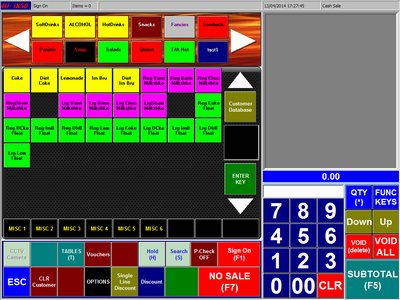
This is the PoS Till LayoutThe main menu's are across the top•Sign On Button :- Staff to sign on •No Sale :- Kick out the cash drawer depending on staff level •P.check Button :- check & alter price depending on staff level •Hold Button:- Hold current transaction and start serving next customer •Voucher Button :- Print Vouchers •Tables Button :- Select section and show tables •ESC Button :- Exit Till •CLR Customer Button :- Clear Customer •Options Button :- select available options to add to item •Single Line Discount Button:- Allow a discount to a single item •Discount Button :- Apply % discount to all sale (enter 10 on keypad then discount button to apply 10% discount) •FUNC Keys Button :- Extra buttons for Petty Cash, Returns, Re-Print and Manager Mode •Void(Delete) Button :- Void single item or add extra text to item •Void All Button :- Void all sale •Subtotal Button :- Make payment |