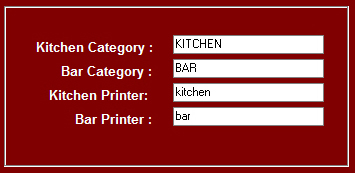
Kitchen & Bar Printer are connected via Windows Printer Drivers
The Main Printer and Cash Drawer are connected Via OPOS
Cash Drawer plugs into the DK socket of the receipt Printer
we recommend using the names "KITCHEN" for the Kitchen Printer
and "BAR" for the Bar Printer
|
You can change the settings from the Manger ModeBy DefaultKitchen Category is "KITCHEN" and Kitchen Printer is "kitchen"Bar Category is "BAR" and Bar Printer is "bar"Please note, the category is stock category 2 in the Back Office |