Creating a new Record using in-house barcodes
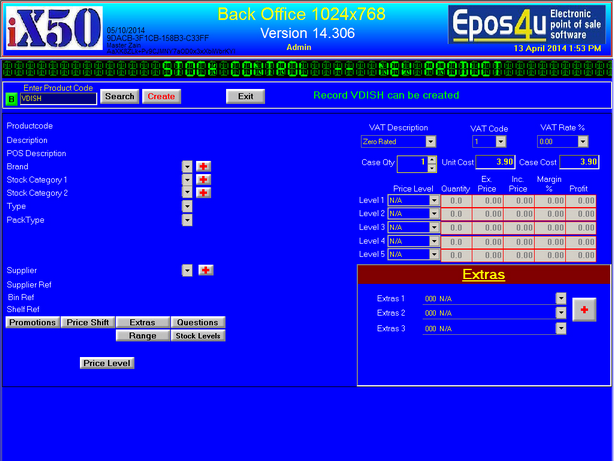
Enter a product code, you can make any product code up as a short reference for internal use
please note product code and barcode are not the same!!
Product codes are unique, once a unique product code has been entered
you can then click on the Create button to proceed
|
Entering details for new Record
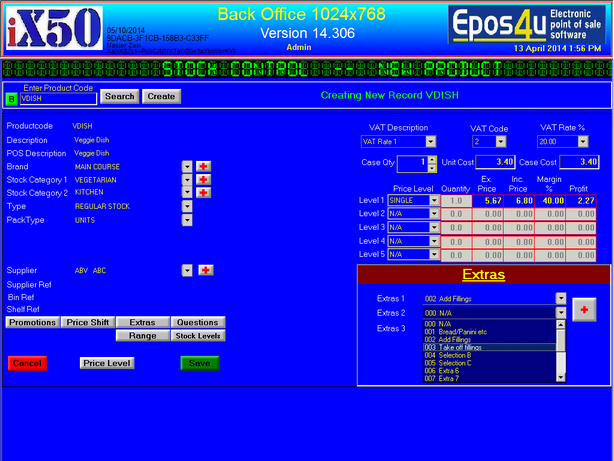
Please note :- 3 fields are compulsory, without these the save button will not appear. Brand - Stock Category 1 - Supplier
1. Description :- Enter description of the item
2. POS Description :- Enter or Amend, this is what it prints on the receipt
3. Brand :- This is needed, and is the main category, click on + to create a new Brand
4. Stock Category 1 :- This is needed, is the sub category of Brand, Click on + to create a new category
5. Stock Category 2 :- Click to create sub category, or use KITCHEN or BAR for the printers to print.
6.Supplier :- This is needed, select supplier or click + to create a new supplier
7. Select VAT rate
8.Enter Unit Cost price, this is cost price excluding VAT
9.Enter Inc. Price, This is the retail selling price
10.Select Extra pop ups from the Extra section or click + to create new Extra pop ups 11.Click Save to save the record |