We will show you how to create a Matrix record
In This example, will will create a pair of trousers
with waist and leg lengths and colours
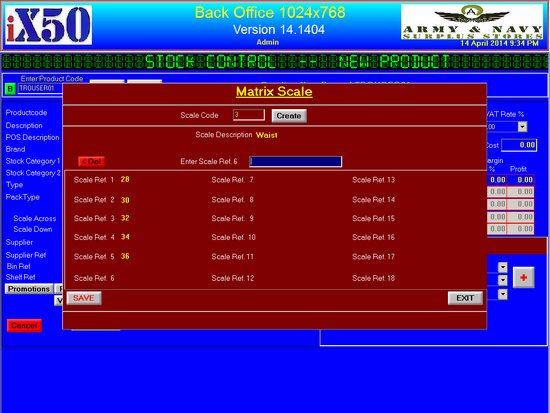
•Create a new Record, we have called it TROUSER01
•fill Description, Brand, Stock Category 1, and supplier
•select SIZE MATRIX from the Pack Type drop down
•Lets call it Scale Code 3, Click Create
•Enter Waist as Scale Description, and enter the scales 28,30,32,34,36
•Enter each scale, click ADD or Return key to proceed to next
•Once Done Click Save
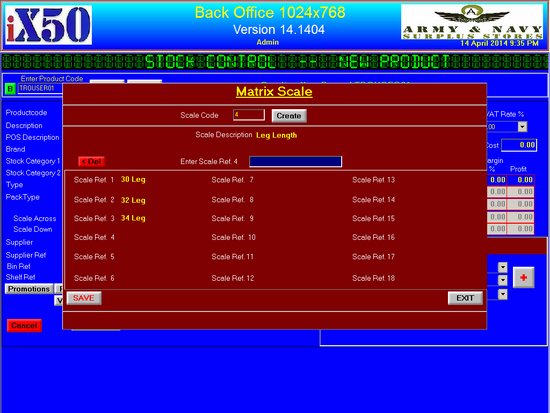
•Lets call it Scale Code 4, Click Create
•Enter Leg Length as Scale Description, and enter the scales 30 Leg, 32 Leg, 34 Leg
•Enter each scale, click ADD or Return key to proceed to next
•Once Done Click Save
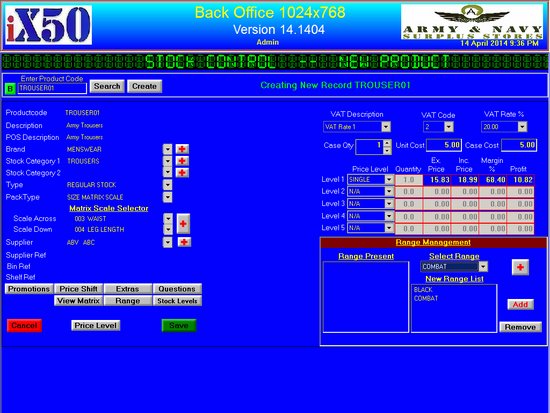
•Click Range Button to add Colours
•Once done, Click Save Button